Florist Software — the practical 2026 guide
Which software florist studios actually need — POS, inventory, wedding management, delivery routing, and accounting. Real tools and honest tradeoffs.
Florist software conversations usually recommend an all-in-one tool (FloristWare, Details Flowers Software). Reality: for most studios, best-of-breed general small business tools work better and cost less.
This guide covers what you actually need, tradeoffs of each category, and specific tool recommendations.
TL;DR. Working florist software stack: POS (Square or Shopify), wedding management (HoneyBook or Aisle Planner), accounting (QuickBooks Online or Xero), Google Contacts for CRM, and Later or Buffer for Instagram scheduling. Monthly cost: $80-200.
The essential stack
Every florist studio needs these five categories.
1 — POS (point of sale)
For retail purchases and cash handling.
Options:
- Square — free tier, easy setup, no monthly cost until scale
- Shopify POS — integrates online + retail
- Lightspeed — mid-market retail
- Clover — merchant service integrated
Recommendation: Square for new studios. Shopify if e-commerce focused.
2 — Wedding management
Contracts, invoicing, client communication for wedding events.
Options:
- HoneyBook — $40/month. Contract templates, invoicing, client portal. Wedding-focused.
- Aisle Planner — $30-70/month. Wedding-specific with planning workflow.
- Dubsado — $35/month. General service business but works.
- Notion + custom templates — $10/month if you configure.
Recommendation: HoneyBook for wedding-focused studios; Aisle Planner if working with planners.
3 — Accounting
Bookkeeping, invoicing, tax preparation.
Options:
- QuickBooks Online — $30-80/month. US standard.
- Xero — $30-80/month. Better UI, international.
- FreshBooks — $20-60/month. Simpler for solo studios.
- Wave — free. Basic; grow out of it.
Recommendation: QuickBooks Online for US, Xero for international.
4 — CRM (Customer Relationship Management)
Contact database, notes, follow-ups.
Options:
- HoneyBook (covers CRM if used for weddings)
- Notion database
- Google Contacts (free, adequate for under 500 clients)
- HubSpot free tier (adequate for 1,000 clients)
Recommendation: whichever you're already using for weddings. Skip dedicated CRM initially.
5 — Instagram scheduling
Content batching and scheduling.
Options:
- Later — $18-40/month. Instagram-focused, visual scheduler.
- Buffer — $15-100/month. Multi-platform.
- Meta Business Suite — free. Native Instagram/Facebook.
Recommendation: Later for visual florist workflow.

The extended stack (for larger studios)
At $200K+ revenue, add:
Inventory management
- Sortly — $50/month. Photo-based inventory.
- Cin7 — $200+/month. Full inventory + wholesale integration.
- QuickBooks Inventory — included in higher tiers.
Adds precise tracking of wholesale flower spoilage, container inventory, ribbon and tool tracking.
Delivery routing
- Google Maps with saved delivery pins (free)
- Onfleet — for scale ($150+/month)
- Route4Me — $60/month, mid-market
For studios doing 10+ daily deliveries.
Communication
- Google Workspace — $6-15/user/month
- WhatsApp Business (free)
For client communication management.
Website / e-commerce
- Shopify — $39-399/month + transaction fees
- Squarespace — $20-50/month
- Webflow — $18-100/month
- WordPress + WooCommerce — $15-100/month hosting
For e-commerce or content-heavy websites.
Stack cost summary
Small solo studio: $80-150/month
- Square POS: $0
- HoneyBook or Notion: $30-50
- QuickBooks Online: $30-50
- Google Contacts: $0
- Later: $18-25
Mid-size studio: $150-300/month
- Above + Sortly or Cin7 basic: $50-100
Large studio: $250-500/month
- Above + Onfleet or Route4Me: $60-200
- Google Workspace multi-user: $30-90
The all-in-one alternative — worth it?
Some studios buy florist-specific all-in-one software (Details Flowers Software, FloristWare, similar). Trade-offs:
Pros:
- Single interface
- Florist-specific templates
- Integrated inventory + POS + delivery
Cons:
- Higher monthly cost ($100-300/month starting)
- Lock-in (hard to switch)
- Less powerful than best-of-breed individual tools
- Fewer integrations
Recommendation: best-of-breed for solo and small studios. All-in-one considered only at 5+ employee studios where integration matters.
What we build ourselves
Full disclosure: after years of running studios in three countries on stitched-together spreadsheets, we started building the tools we wished existed. Both have free tiers, so try them against anything in this guide:
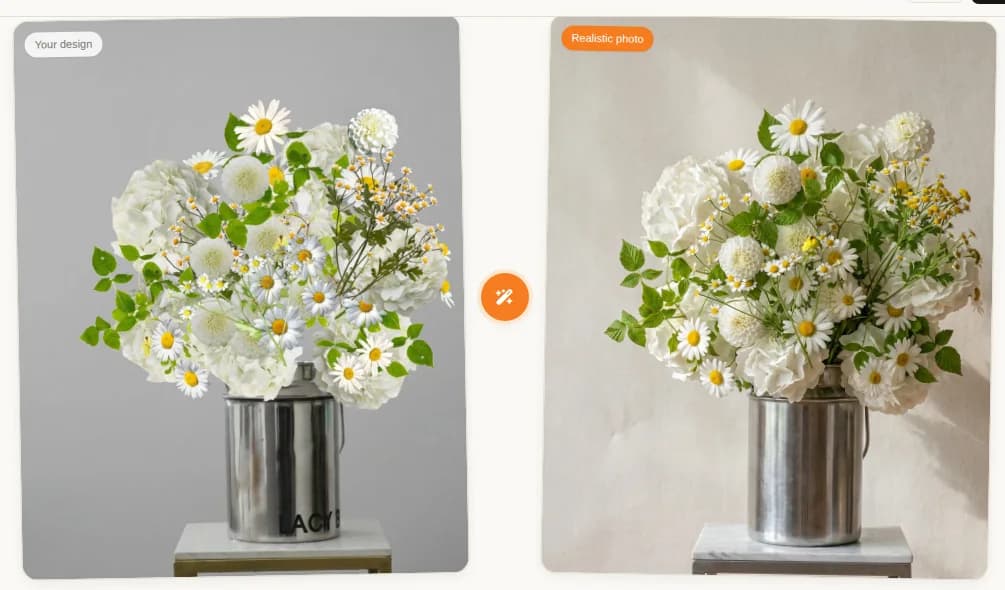
- Bouquet Builder — a design canvas that turns a drag-and-drop bouquet sketch into a photorealistic photo in one tap. 570+ flower varieties, live recipe pricing and a procurement list, client-share links. Solves the "will the client approve it before I buy the stems" problem. Free plan; Pro from $11.99/month.
- Acanta — the all-in-one we just cautioned you about, built the way florists actually work: online storefront with live stock, WhatsApp/Instagram/Telegram in one inbox, stem-accurate FIFO costing for weddings, AI quality scoring of finished bouquets, team analytics. Free up to 50 orders/month; Pro $59/month.
They earn their place in this guide by the same test as every other tool here: start free, keep them only if they save you hours.
When to add wedding management software
Add dedicated wedding software when:
- 5+ weddings per year
- Weddings represent 30%+ of revenue
- You have any confusion about which contracts are signed
At fewer than 5 weddings/year, contracts in DocuSign + spreadsheet tracking works.
When to add inventory management
Add when:
- Retail inventory exceeds 200 SKUs
- Wholesale spoilage exceeds 5% of orders
- You've lost track of what you have
- You want tax deduction precision
Under those thresholds: spreadsheet works.

Common software mistakes
Buying all-in-one before you need it. Small studios don't need integration. Best-of-breed cheaper.
Not integrating. Zapier + basic integrations save hours.
Manual data entry. POS should auto-sync to accounting.
No cloud backup. Local software loses data. Cloud native only.
Adopting too many tools too fast. Add one, master it, then add next.
Free tools you outgrow. Wave accounting is free but limits. Plan the upgrade before crashing into limits.
Data flow diagram
Ideal integration: POS (Square) → Accounting (QuickBooks) → Tax prep Wedding software (HoneyBook) → Accounting (QuickBooks) Wedding software → Google Calendar Instagram scheduler (Later) → Instagram
Zapier or Make.com automates most connections.
Migration and switching
Every 2-3 years, evaluate current stack.
Reasons to switch:
- Team growing beyond current tool capacity
- Cost creeping past 3% of revenue
- New features in competitor tools
- Integration limits
Reasons not to switch:
- New tool "sounds better"
- Slick marketing
- Consultant recommendation without your specific needs
Switching costs time. Evaluate honestly before moving.
FAQ
What software do florists need?
Essential: POS (Square, Shopify), wedding management (HoneyBook, Aisle Planner), accounting (QuickBooks Online, Xero), Google Workspace, Instagram scheduling (Later, Buffer). Optional at scale: inventory management, delivery routing.
Best POS?
Square: free tier, easy setup, easiest for new studios. Shopify POS: integrates online + retail. Lightspeed: mid-market. Toast not designed for florists.
Need dedicated florist software?
For weddings under 5/year: no — spreadsheets + DocuSign work. Over 5/year: yes — HoneyBook or Aisle Planner streamline contracts and communication.
How much per month?
Small home-based studio: $50-100. Mid-size studio: $100-250. Larger studios with team: $250-500. Software cost is 1-3% of revenue.
Related reading: