Florist Website — what it must have to convert
The essential pages, structure, and conversion mechanics of a florist website that books inquiries. From homepage to inquiry form.
Your website is where wedding directory referrals, Instagram clicks, and Google searches convert to booked work — or they don't. A well-designed florist website converts 3-8% of wedding traffic; a poorly-designed one under 1%.
This guide covers the essential pages, platform choices, and conversion mechanics.
TL;DR. A working florist website has 6-8 essential pages: homepage, portfolio, wedding services, about, contact/inquire, and 3-5 SEO landing pages. Squarespace or Shopify for most studios ($200-500/year). Wedding studios should convert 3-8% of visitors to inquiries.
The six essential pages
1 — Homepage
- Hero image (best portfolio piece)
- Studio positioning in one sentence
- 3-4 featured portfolio pieces
- Wedding services teaser
- Instagram feed embed (recent)
- Clear inquiry CTA above and below fold
Above-fold priority: what studio, what specialty, how to contact.
2 — Portfolio
- Organized by category (bouquets, ceremony, centerpieces, editorial)
- 30-50 pieces minimum
- Multi-angle photography for each
- Wedding stories with 6-10 images per event
- Filter by palette or style (nice-to-have)
3 — Wedding services
- Service tiers with descriptions
- Starting-price transparency
- What's included at each tier
- FAQ section
- Booking process explanation
4 — About / Studio story
- Studio founder story
- Aesthetic philosophy
- Team members
- Press features (if any)
- Photo of you at work
5 — Contact / Inquire form
- Simple form (name, email, date, venue, budget range)
- Response time promise
- Alternative contact (phone, Instagram)
- Availability calendar (optional)
6 — Testimonials
- Direct client quotes
- Real client names and dates
- Photos from their wedding
- Star ratings from Google/directories
Plus 3-5 SEO landing pages:
- "Wedding florist [city]"
- "Bridal bouquet [city]"
- "Wedding flower delivery [city]"
- Etc.
Platform comparison
Squarespace ($16-49/month)
- Beautiful default templates
- Easy setup (2-3 days for a working site)
- Built-in commerce optional
- No custom code needed
- Limited to Squarespace-specific features
Best for: most florist studios.
Shopify ($39-399/month)
- Superior e-commerce
- Product catalog for retail
- Payment processing integrated
- Higher learning curve
- Requires app subscriptions for extras
Best for: retail-heavy studios or subscription florists.
Webflow ($18-100/month)
- Custom design flexibility
- Better SEO out of box
- Learning curve
- CMS for blogging
Best for: studios wanting custom look without WordPress maintenance.
WordPress + WooCommerce
- Highest flexibility
- Cheapest hosting ($10-30/month)
- Requires maintenance and security
- Steep learning curve
- Best for high-traffic content sites
Best for: florists with tech skills or budget for developer.
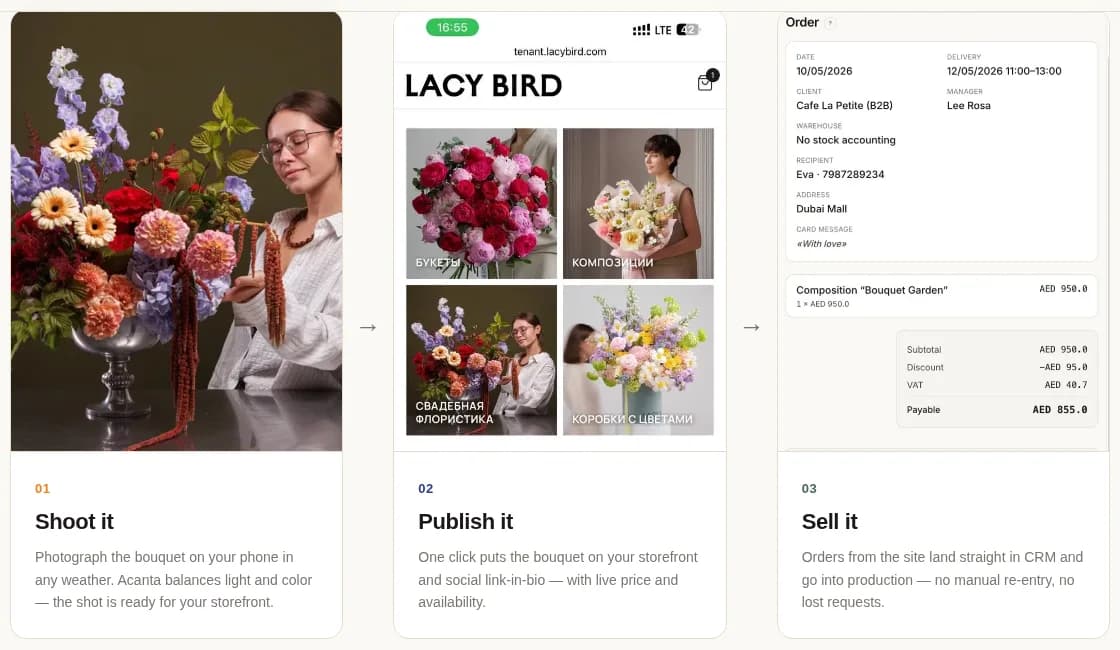
Design principles
Above-the-fold priority
Visitors decide in 5 seconds. Show:
- Hero image (best work)
- One sentence positioning
- Clear CTA (inquire, view portfolio)
Portfolio-first design
Website design should showcase flowers, not fight them.
- Neutral backgrounds
- Minimal text on portfolio pages
- Full-width imagery
- White space around images
- No overlapping elements
Consistent typography
- 2-3 fonts maximum
- One for headings, one for body
- Consistent sizing hierarchy
- Serif for luxury, sans-serif for modern
Mobile-first
70%+ of florist website traffic is mobile.
- Test every page on mobile
- Fast loading (under 3 seconds)
- Thumb-friendly buttons
- Simple mobile navigation
Conversion mechanics
The inquiry form
Simple wins. Every extra field reduces submissions 5-10%.
Essential fields:
- Name
- Wedding date
- Venue (optional)
- Budget range (dropdown, not open)
- What flowers or vision (open text)
Skip:
- Phone (optional)
- Photo upload
- Long personal details
The CTA hierarchy
Primary CTA: "Inquire" or "Book Consultation" Secondary CTA: "View Portfolio" Tertiary CTA: "See Wedding Packages"
Every page should have primary CTA visible.
Response time promise
"We respond within 24 hours" or "48 hours."
Missed promises destroy trust. Deliver on stated time.
Auto-response
After inquiry submission, immediate email confirmation. Sets expectations and prevents "did they get it?" concern.
SEO for florist websites
Local search drives significant traffic. Optimize for:
Target keywords per page:
- Homepage: "florist [city]" or "wedding florist [city]"
- Portfolio: "wedding flowers [city]", "bridal bouquet [city]"
- Services: "wedding flower packages [city]"
On-page SEO:
- Page titles include target keyword + location
- Meta descriptions describe page + include location
- Image alt text describes contents + keyword
- Schema markup for Local Business
- Internal linking between related pages
Off-page SEO:
- Google Business Profile completion
- Wedding directory listings
- Local blog partnerships
- Client reviews on Google
Photography and copy
Photography investment
- 30-50 pieces professionally photographed
- Consistent style, background, editing
- Multi-angle for hero images
- Behind-the-scenes for authenticity
Copywriting principles
- Concise (fewer words work better)
- Client-focused (their wedding, not your studio)
- Specific (real cultivars, real weddings, real numbers)
- Warm but professional tone
Website launch checklist
- 6-8 pages complete
- 30-50 portfolio pieces
- Contact form tested
- Auto-response working
- Google Analytics installed
- Google Business Profile linked
- SSL certificate active
- Mobile responsive
- Loading under 3 seconds
- Copyright and privacy policy
- Instagram feed embedded
Common website mistakes
Weak photography. All the design in the world can't fix bad photos.
Cluttered navigation. More than 5-7 nav items overwhelms.
No clear CTA. If visitors don't know what to do, they leave.
Slow loading. Every second over 3 loses 30% of visitors.
No mobile optimization. 70%+ traffic is mobile.
Buried inquiry form. Should be accessible from every page.
Cheap-looking template. Investment in design pays dividends.
Skipping SEO. SEO drives long-term traffic; ignoring it loses years.
FAQ
What pages does a website need?
Six essential: homepage, portfolio, wedding services, about, contact/inquire, testimonials. Plus 3-5 SEO landing pages. Optional: blog, subscription page.
Best platform?
Squarespace for most studios ($16-49/month). Shopify if e-commerce heavy ($39-399/month). Webflow for custom design. WordPress requires maintenance.
Cost?
DIY on Squarespace: $200-500/year. Small custom design: $2,000-5,000 one-time. Luxury bespoke: $10,000-30,000+ one-time.
Conversion rate?
Wedding-focused: 3-8% of visitors inquire. Retail: 1-3% purchase. Under 1% suggests weak portfolio or unclear CTA.
Related reading: